
 English
 German
  Italian
  Hi, User
 Weltrade Registration: Complete Guide to Opening Your Forex Trading Account
Opening a forex trading account can be overwhelming due to the registration forms, verification requirements, and multiple account options. One wrong choice could result in an unsuitable account type or frustrating delays.
This guide simplifies the Weltrade registration process, walking you through every step from account creation to your first deposit. Whether you’re a complete beginner or an experienced trader switching brokers, you’ll have a fully verified trading account ready by the end.
We’ve broken down the process into clear, manageable steps with no jargon or confusing technical terms. You’ll learn how to choose the right account type, handle document verification, fund your account, and set up your trading platform, all while avoiding common pitfalls that delay new traders. Let’s get you trading-ready with confidence.
What is Weltrade?
Weltrade is an international forex and CFD broker established in 2006, offering trading services worldwide. The broker provides access to major currency pairs, commodities, indices, and cryptocurrencies through MetaTrader 4.
Key features include:
- Low minimum deposit of $1, making it accessible for beginners (synthetic account)
- Multiple account types (Micro, Premium, Pro) based on your capital and experience
- Competitive spreads starting from 0 pips on certain accounts
- Educational resources including webinars, tutorials, and trading guides
- Global accessibility with multiple deposit and withdrawal options
The registration process typically takes 10-15 minutes to complete.

What You Need Before Starting
Gather these items before beginning registration:
Personal Documents:
- Government-issued photo ID (passport, driver’s license, or national ID)
- Recent utility bill or bank statement (within last 3 months) for address verification
- Documents should be clear and show all four corners
Contact Information:
- Valid email address
- Active phone number
- Current residential address matching your proof of address
Financial Details:

- Source of income information
- Estimated annual income range
- Trading experience level
Payment Method:
- Credit/debit card, e-wallet, or bank account in your name
Having these ready prevents interruptions and speeds up verification significantly.
Step-by-Step Registration Process
Step 1: Access the Registration Page
Navigate to weltrade.com and locate the “Open Account” or “Register” button in the top-right corner. Always verify you’re on the legitimate website by checking for “https://” and a padlock icon in the URL bar.
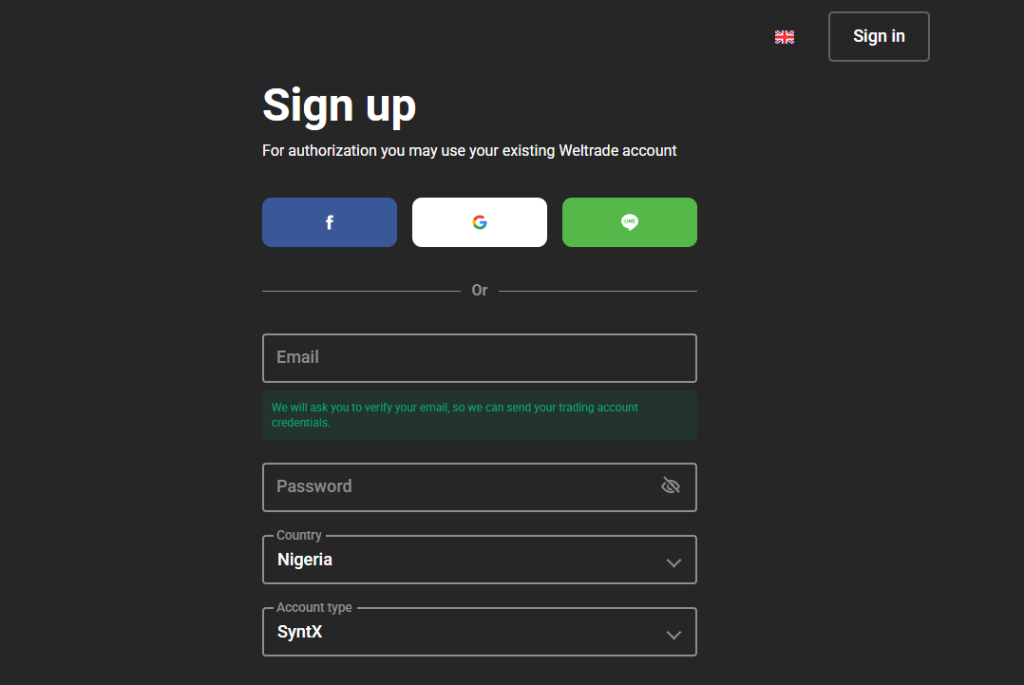
Step 2: Complete Basic Registration
Fill out the initial form with:
- Full legal name (exactly as on your ID)
- Email address
- Country of residence
- Phone number with country code
- Strong password (letters, numbers, symbols)
- Account currency selection (choose carefully—this cannot be changed)
Read and accept the terms and conditions, then submit.
Step 3: Verify Your Email
Weltrade sends a verification email within 1-2 minutes. Open your inbox, locate the email (check spam if needed), and click the verification link. This activates your account for the next steps.

If the email doesn’t arrive, wait 5 minutes, check all folders, or request a new verification email.
Step 4: Complete Your Personal Profile
Log into your account and provide detailed information:
Personal Information:
- Date and place of birth
- Citizenship
- Full residential address
- Tax identification number (if applicable)
Employment and Financial Details:
- Employment status and occupation
- Annual income range
- Net worth estimate
- Source of funds for trading
Trading Experience:
- Years of forex/CFD experience
- Trading frequency
- Familiarity with leveraged products
- Financial markets knowledge
Answer honestly—accurate information helps Weltrade assign appropriate features and doesn’t affect account approval.
Step 5: Choose Your Account Type
Weltrade offers several account types:
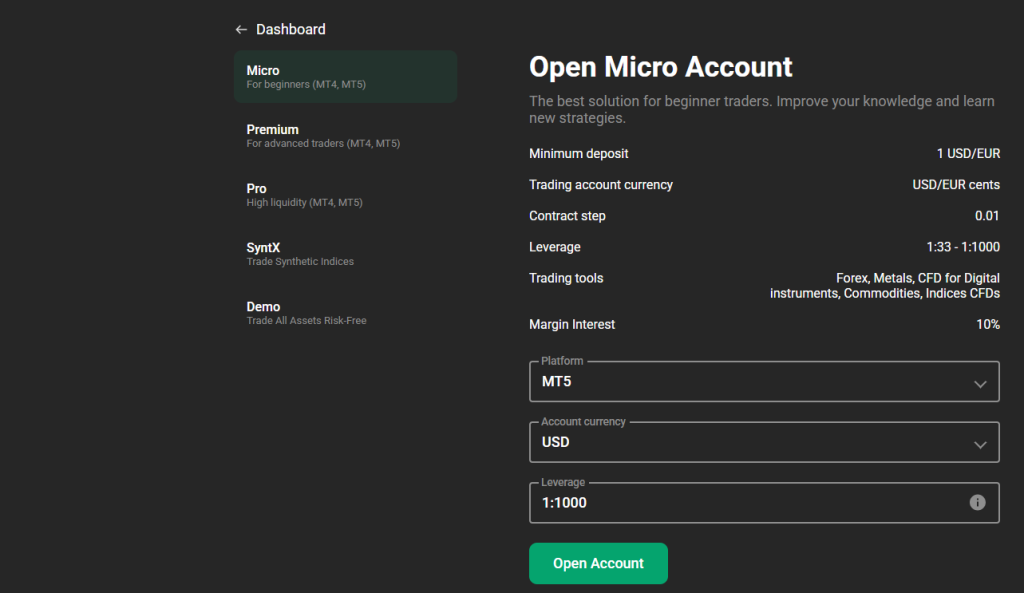
Micro Account:
- Minimum deposit: $1 (synthetic accounts)
- Micro lots
- Best for: Complete beginners
Premium Account:
- Minimum deposit: $250
- Best for: Intermediate traders
- Competitive spreads
Pro Account:
- Minimum deposit: $100
- Best for: Experienced traders
- Tightest spreads available
Pro Account:
- Raw spreads from 0 pips plus commission
- Best for: Professional traders and scalpers
Syntx Account:
- Minimum deposit: $1
- best for beginners Up to 1:1000 leverage available for all accounts and up to 1:10000 for the synthetic account.
Select the account matching your capital and experience. You can open additional accounts later.
After registration, use a demo account to learn how synthetic indices like Flip X and Pain and Gain Index behave before risking real capital.
Step 6: Set Trading Preferences
Configure your trading environment:
Leverage: Choose your maximum leverage ratio. While high leverage increases profit potential, it also increases risk. Conservative traders typically use 1:50 to 1:100.
Platform: Confirm MetaTrader 4 as your platform (available via desktop, web, or mobile).
Communication: Select which updates you’d like to receive (market analysis, educational content, promotional offers).
Step 7: Submit Verification Documents
Upload identity and address verification documents:
Proof of Identity (one of these):
- International passport
- National identity card (both sides)
- Driver’s license (both sides)
Requirements:
- All corners visible
- Information clearly readable
- Currently valid
- Name matching registration exactly
Proof of Address (dated within 3 months):
- Utility bill
- Bank statement
- Tax assessment notice
Upload clear scans or photos in JPEG, PNG, or PDF format through your account dashboard.
Verification Process
Weltrade’s compliance team reviews documents within 24-48 business hours. They verify identity authenticity, address matching, age requirements, and source of funds legitimacy.
Common rejection reasons:
- Expired documents
- Poor image quality
- Name mismatch
- Address document older than 3 months
- Screenshots instead of scans
If rejected, carefully read the reason, obtain better images or correct documents, and resubmit.
Funding Your Account
Once verified, deposit funds using:
Credit/Debit Cards: Instant to 24 hours processing
Bank Transfer: Instant to 24 hours
E-Wallets: Instant to few hours (Skrill, Neteller, Volet)
Cryptocurrency: Network-dependent timing (Binance pay, USDT)
How to deposit:
- Log into your account
- Navigate to “Deposit” section
- Select payment method
- Enter deposit amount (meet account minimum)
- Complete transaction through payment processor
- Save confirmation receipt
Start with the minimum to test the process, and only deposit funds you can afford to lose.
Setting Up MetaTrader 4
Download MT4 from your Weltrade account dashboard (Windows/Mac desktop, web platform, or mobile app). You’ll receive login credentials via email:
- Login ID (account number)
- Password (different from website password)
- Server name
Enter these in MT4’s login window to access your trading account.
Initial setup:
- Customize your workspace and chart settings
- Add currency pairs to Market Watch
- Configure technical indicators
- Save your layout template
Spend time familiarizing yourself with MT4 before placing real trades.
Security Best Practices
Protect your account by:
- Creating strong, unique passwords (12+ characters)
- Enabling two-factor authentication
- Securing your email account
- Keeping software updated
- Avoiding public Wi-Fi for trading
- Monitoring account activity regularly
- Reporting suspicious activity immediately
Never share passwords or 2FA codes with anyone, including people claiming to be support staff.
Common Problems and Solutions
Email not received: Check spam folders, wait 10 minutes, request new email
Documents rejected: Improve photo quality, ensure documents are current, verify name matches
Deposit missing: Check processing time, verify correct account number, contact support with transaction reference
MT4 login fails: Verify credentials, check server selection, ensure account is verified and funded
Registration not accepted: Verify country eligibility, check document acceptance, contact support
Contact Weltrade support through live chat or email at support@weltrade.com if issues persist.
Next Steps After Registration
Before live trading:
Complete Education: Watch tutorials, review forex basics, understand leverage and margin, study risk management
Develop a Trading Plan: Define which pairs to trade, set entry/exit criteria, establish position sizing rules, determine loss limits
Practice Risk Management: Never risk more than 1-2% per trade, always use stop-loss orders, start with small positions, avoid over-leveraging
Keep Learning: Follow economic calendars, read market analysis, join trading communities, maintain a trade journal.
Conclusion
You’ve successfully completed the Weltrade registration process. Your account is ready, but remember this is just the beginning. Successful trading requires patience, discipline, and continuous learning.
Take time to understand the platform thoroughly, practice with small positions, and develop a solid strategy aligned with your goals and risk tolerance. Forex trading involves substantial risk—only trade with money you can afford to lose.
Your Weltrade account is now your gateway to global forex markets. Trade responsibly, stay disciplined, and never stop learning. Welcome to the trading community!
Post a Reply
You must be logged in to post a comment.