
 English
 German
  Italian
  Hi, User
 Weltrade Charts: Your Complete Guide to the TradingView-Powered Platform
Ever felt overwhelmed trying to analyze price movements on a clunky, outdated trading platform? You’re not alone. Many forex traders struggle with chart interfaces that are either too basic to provide meaningful insights or so complex that they become a distraction from actual trading.
Weltrade solves this challenge by integrating TradingView’s industry-leading charting technology directly into its trading ecosystem. Whether you’re analyzing currency pairs at 3 AM or checking synthetic indices over your lunch break, you’ll have access to professional-grade charts that make technical analysis straightforward and actionable.

In this guide, you’ll discover everything about Weltrade’s charting capabilities, from the platforms available to the advanced tools that can transform your trading analysis. By the end, you’ll know exactly how to leverage these charts to make more informed trading decisions.
Why Weltrade’s Charting Solution Stands Out
Weltrade doesn’t just offer charts; it provides a comprehensive charting ecosystem designed for traders at every level. The broker has strategically partnered with TradingView, the world’s most popular charting platform, ensuring you get institutional-grade analysis tools without the institutional price tag.
What makes this partnership particularly valuable is the seamless integration across all Weltrade platforms. Whether you’re trading on MetaTrader 4, MetaTrader 5, or accessing markets through the web platform, you’ll find consistent charting capabilities that travel with you across devices.
The platform supports all major asset classes available through Weltrade: forex pairs, synthetic indices that trade 24/7, commodities, and various CFDs. This means you can analyze EUR/USD and gold all using the same familiar charting interface.

TradingView Charts: The Professional’s Choice
Weltrade’s integration with TradingView gives you access to one of the most powerful charting platforms in the industry. TradingView has become the global standard for technical analysis, trusted by millions of traders worldwide.
The TradingView interface offers real-time data visualization with lightning-fast updates, ensuring you’re always seeing current market conditions. The charts load quickly and respond instantly to your inputs no frustrating lag that could cost you trading opportunities.
You’ll find an extensive library of technical indicators built right into the platform. From simple moving averages to complex oscillators and custom indicators created by the TradingView community, everything is available at your fingertips. The drawing tools are equally comprehensive, allowing you to mark support and resistance levels, draw trend lines, create Fibonacci retracements, and annotate your charts with precision.
The social features of TradingView also add unique value. You can view trading ideas shared by experienced traders, learn from their analysis, and even publish your own chart setups to get community feedback. This transforms charting from a solitary activity into a collaborative learning experience.

MetaTrader 4 and MetaTrader 5 Charting Capabilities
Beyond TradingView, Weltrade offers the time-tested charting systems within the MetaTrader 4 and MetaTrader 5 platforms.
These platforms remain industry favorites for good reason: they’re reliable, feature-rich, and familiar to traders globally.
MetaTrader 4 Charts
It provides a clean, efficient interface with nine timeframes ranging from one-minute to monthly charts. The platform includes 30 built-in technical indicators and allows you to add custom indicators from the extensive MQL4 community. You can open multiple chart windows simultaneously, making it easy to monitor several currency pairs or different timeframes of the same asset.
MetaTrader 5 Charts
This builds on MT4’s foundation with enhanced features. You get 21 timeframes instead of nine, providing more granular analysis options. The platform includes 38 technical indicators and 44 graphical objects for chart annotation. The economic calendar integration means you can see upcoming news events directly on your charts, helping you avoid trading during high-volatility announcements.
Both platforms allow one-click trading directly from charts. You can place orders, modify positions, and close trades without leaving your chart view, a feature that serious traders appreciate for its efficiency.
Weltrade makes these platforms available across all devices. Download MT4 or MT5 for Windows, run them natively on MacOS, or use the mobile apps for iOS and Android. Your chart setups, indicators, and templates sync across devices when you log into your Weltrade account.

Web Platform: Trade Anywhere, Anytime
For traders who prefer not to download software, Weltrade’s web platform delivers full charting functionality through your browser. This is particularly useful when you’re using a computer where you can’t install applications, perhaps at work or while traveling.
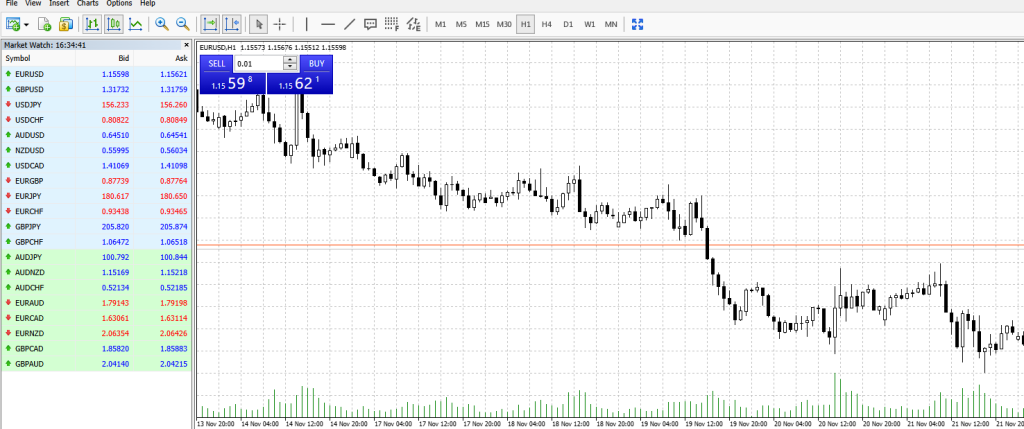
The web platform provides access to all the essential charting tools you need. Multiple chart types (candlesticks, bars, line charts), customizable timeframes, and a selection of the most popular technical indicators are all available. The interface is intuitive and responsive, loading quickly even on slower internet connections.
One significant advantage of the web platform is its accessibility. Whether you’re using Chrome on Windows, Safari on Mac, or any modern browser, you can access your Weltrade charts with just your login credentials. Your trading analysis isn’t tied to a specific device or software installation.
The web platform particularly shines for traders who monitor the 24/7 synthetic indices that Weltrade offers. Since these markets never close, having browser-based access means you can check positions and analyze trends whenever inspiration strikes, without the need to boot up specific trading software.
Mobile Charting: Trading in Your Pocket
Weltrade’s mobile application brings professional charting to your smartphone and tablet. Available for both iOS and Android, the mobile app ensures you’re never disconnected from the markets.
The mobile charts maintain impressive functionality despite the smaller screen. You can view multiple timeframes, apply technical indicators, and draw trend lines using touch controls. The interface adapts intelligently to mobile screens, making chart analysis surprisingly comfortable even on a phone.
Push notifications keep you informed about price alerts you’ve set, so you don’t need to constantly watch charts. Set an alert for when EUR/USD hits a specific level, and the app will notify you when the price reaches your target, whether you’re in a meeting or enjoying dinner.
The mobile app also includes the personal trading area, where you can manage deposits, withdrawals, and account settings. This integration means you can handle your complete trading workflow from one mobile application.
Customization and Chart Templates
Professional traders know that chart setup matters. Weltrade platforms allow extensive customization so you can create chart environments that match your trading style.
You can customize color schemes for better visibility, choosing between dark mode for night trading or bright themes for daytime use. Adjust candlestick colors, background tones, and grid visibility to reduce eye strain during extended analysis sessions.
Save your indicator combinations and chart layouts as templates. If you use specific moving averages, RSI settings, and Fibonacci tools for your strategy, set them up once and apply that template to any chart instantly. This saves valuable time and ensures consistency in your analysis.
Multi-chart layouts let you monitor several markets simultaneously. Open a four-chart window with EUR/USD, GBP/USD, gold, and the Weltrade flip X index all visible at once. This bird’s-eye view helps you spot correlations and trading opportunities across different assets.
Advanced Features for Serious Traders
Weltrade’s charting ecosystem includes sophisticated tools for traders ready to take their analysis deeper.
The economic calendar integration shows you exactly when major news events occur. Color-coded by importance, you’ll know when to expect potential volatility from central bank decisions, employment data, or GDP releases.
Multiple indicator overlays allow complex technical analysis setups. Layer Bollinger Bands over moving averages, add volume analysis, and include momentum oscillators all on the same chart. The platforms handle these resource-intensive setups smoothly.
Historical data access means you can backtest trading ideas by analyzing how your strategies would have performed in past market conditions. This is invaluable for building confidence in your approach before risking real capital.
The trading calculator tools integrate with your charts, helping you determine position sizes based on your risk tolerance and stop loss levels. Calculate potential profits, margin requirements, and pip values without leaving your charting interface.
Getting Started with Weltrade Charts
Beginning your journey with Weltrade’s charting tools is straightforward. Open a Micro account with just $1 USD to access the full charting ecosystem. This minimal entry requirement means you can explore the platforms without a significant financial commitment.
Download MetaTrader 4 or MetaTrader 5 from the Weltrade website; both platforms work on Windows and Mac. Install your preferred version and log in with your Weltrade account credentials. Your charts are immediately accessible.
Alternatively, access charts through the web platform by simply logging into your Weltrade account through any browser. No download required—your charts are ready in seconds.
For mobile access, search “Weltrade” in your device’s app store, download the official application, and log in. Your account syncs across all platforms, so a chart setup you create on desktop appears on your mobile device.
Making the Most of Your Charting Experience
To maximize the value from Weltrade’s charting capabilities, start with clean charts. Add indicators purposefully rather than cluttering your screen with every available tool. Most successful traders use just 2-3 indicators that complement their strategy.
Practice using the drawing tools to mark key levels. Identify support and resistance zones, draw trend lines, and note important price areas. These visual markers help you make faster decisions when trading opportunities arise.
Explore TradingView’s educational resources and community trading ideas. You’ll discover new ways to use chart tools and gain exposure to different analytical approaches. The learning never stops in trading, and TradingView’s community accelerates your education.
Take advantage of Weltrade’s 24/7 support if you encounter any charting issues. Their multilingual team can help troubleshoot technical problems or explain platform features you’re uncertain about.
Conclusion: Chart Your Path to Trading Success
Weltrade’s comprehensive charting solution gives you professional-grade analysis tools across every device and platform. From TradingView’s industry-leading interface to the proven reliability of MetaTrader 4 and 5, you have everything needed to analyze markets effectively and make informed trading decisions.
The integration of these charting systems with Weltrade’s competitive spreads, 24/7 synthetic indices, and user-friendly trading conditions creates a complete trading ecosystem. You’re not just getting charts—you’re accessing a full support system designed to help you succeed in the forex markets.
Ready to experience these charting capabilities yourself? Open your Weltrade account today and discover why over 100,000 traders trust this platform for their market analysis. Whether you start with the $1 Micro account or jump straight to the Pro account for institutional-grade conditions, you’ll have access to the same powerful charting tools from day one.
The markets are waiting, and with Weltrade’s charts, you’ll be equipped to read them clearly.
Post a Reply
You must be logged in to post a comment.